How Formally Verified Code Goes Wrong and How to Catch It
Four ways formal verification can miss bugs, and how to check the specifications, assumptions, code, and tools behind a proof.
 Mooly Sagiv
 Nisarg Patel
 Chandrakana Nandi
Can formally verified code still have bugs? Yes. Formal verification proves that code meets its specification. It does not prove that the specification is correct, that its assumptions hold in production, that the code running is the code that was checked, or that the verification tool itself is free of bugs. Each of these gaps should be checked before a business relies on the proof.
| "Beware of bugs in the above code; I have only proved it correct, not tried it."
Donald Knuth
Formal verification is rightfully considered the gold standard of software security. The seL4 kernel, the core layer of an operating system that controls everything else running on a device, was designed for formal verification and is considered one of the most secure kernels in use. Researchers have built mature open-source tools that make formal verification easier to apply. Even so, a proof still takes a lot of effort, and most software runs fine despite occasional errors. For most systems, the cost of a proof has outweighed the cost of the bugs it would prevent.
Advances in large language models (LLMs), and coding agents in particular, change both sides of that calculation. Formal verification becomes necessary, because a proof is the only protection against bugs nobody has found yet, including the ones a newer AI model will find. It also becomes easier to use, because LLMs can now find specifications and proofs automatically.
Formal verification is widely used to find bugs. When a proof passes, the executive who signs off on deploying code that will hold customer funds needs to know what that proof guarantees and where it can still fail. If you are new to the subject, What Is Formal Verification? covers the basics, and Formal Verification vs. Testing vs. Auditing compares it with other security methods.
Those of us who build verification tools have a fairly good understanding of what can go wrong. There are four failure points, and each one can be caught before the code reaches production.
The Four Ways Formally Verified Code Goes Wrong
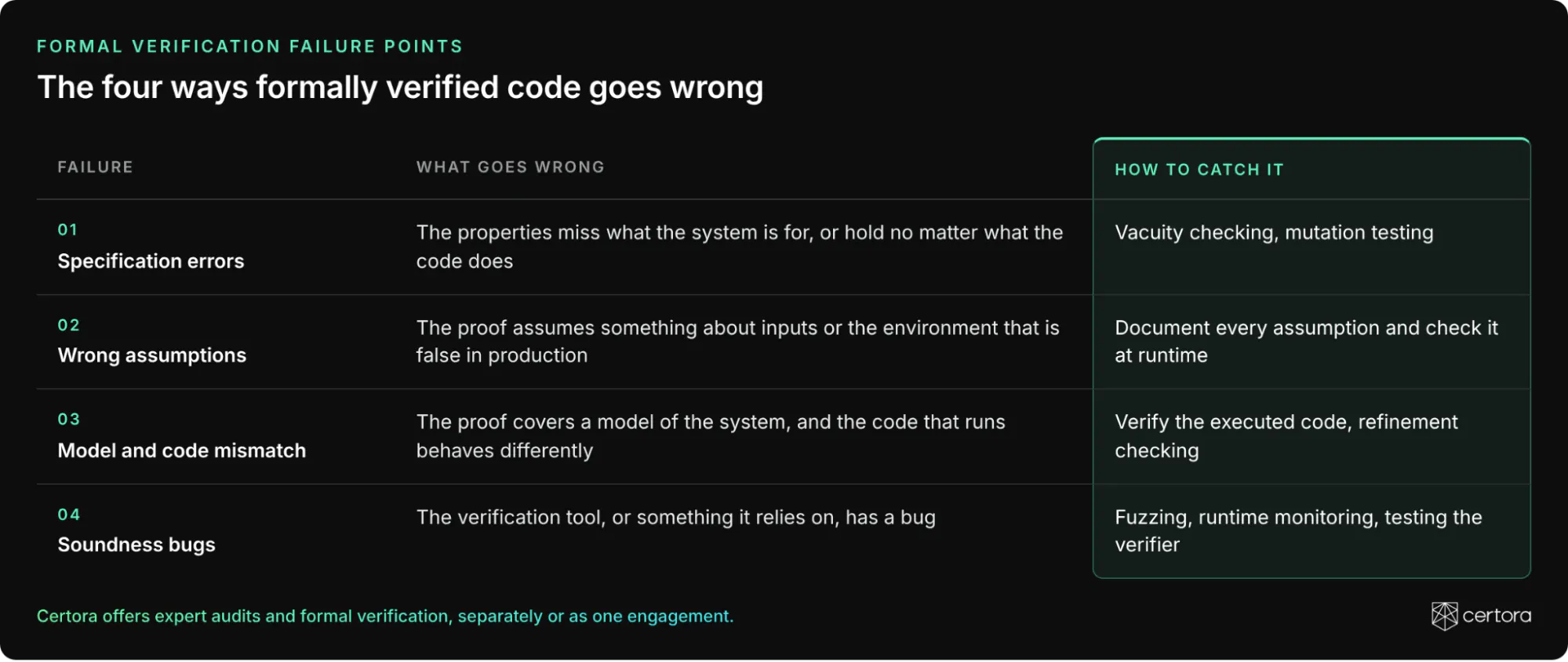
1. Specification Errors in Formal Verification
A specification is the set of properties a system must satisfy, written precisely enough for a tool to check. For a rewards program, one property might be that no user can claim the same reward twice. Defining these high-level requirements is the hardest part of formally verifying a software system.
Some people say that formal verification is the art of making sure that your program and the formal specifications have the same bugs. I believe this is not the case. Formal verification is useful when the properties capture the system's intended use. Once the right properties are captured, we are assured that the system behaves as expected in all the corner cases.
In practice, people who write specifications make mistakes, even on mature, high-profile projects. A 2024 study from the University of Michigan, IronSpec, tested the specifications of six real-world formally verified systems, including the AWS Encryption SDK, and found bugs in all six: ten in total. One common mistake is a vacuous property: one that holds no matter what the code does, so proving it shows nothing.
Notional Finance: a $1 million vacuous invariant
Notional Finance implemented a clever data structure for financial rewards. Notional formally verified an invariant, a rule that must hold at every moment of the contract's life, meant to ensure that no one could receive double rewards. The invariant had a redundant clause that made it a tautology, a statement that is true independently of the system, much like 7 > 6. The proof passed, and the double-rewards bug went straight through it.
In January 2022, a white-hat hacker reported the bug before a black-hat hacker found it, and Notional paid a $1 million bug bounty. If the invariant had been written correctly, the Certora Prover would have identified the error before deployment. Certora's post-mortem walks through the original invariant and the corrected one.
How to catch specification errors
Two techniques test the specification itself. Vacuity checking flags properties that would hold no matter what the code does. At Certora, vacuity checks run as part of every Certora Prover run. Mutation testing introduces small, deliberate changes into the code or the specification, such as rounding up instead of down or adding instead of subtracting, and checks whether verification still passes. When a proof survives a change that should break the system, the specification is missing a case. LLMs could make mutation testing more effective by generating changes closer to real bugs, an approach Certora is exploring.
For more examples, see Finding Bugs in Formal Specifications.
2. When Assumptions About the Environment Are Wrong
Every proof starts from assumptions about the environment the system runs in, such as which inputs it can receive. Some assumptions are explicit and written into the specification. Others are implicit. The proof holds only while those assumptions are true.
Complex systems interact in unpredictable ways. Assumptions are usually mandatory for formal verification, but they must be handled carefully, because in our experience many bugs arise from incorrect assumptions about the environment. A design can be sound and still fail once the world departs from what its designers assumed.
In one case, a Certora Prover specification added a requirement that restricted the range of a smart contract input. A white-hat hacker later reported a hack that used an input outside that range, and a large bug bounty had to be paid. When Certora reran the Prover without that assumption, it flagged the same bug.
How to catch wrong assumptions
The best approach is to document every assumption explicitly in the formal verification and then build checks for them into the live contract. In the Certora Prover, we usually document requirements in the specification, so each one can be checked during execution. If a real input ever falls outside what the proof assumed, the check stops it before it reaches code the proof never covered. Each check adds a small cost in gas, the fee for running a transaction, but the protection is well worth it.
3. When the Verified Model Doesn't Match the Running Code
Formal verification tools work at two levels. Proof assistants such as Rocq and Lean4 reason about a mathematical model of the system. Program verifiers such as Verus and the Certora Prover reason directly about the code. The beauty of proof assistants is that the reasoning is about mathematics, which drastically reduces the complexity of formal verification. It also increases the chance of missing tricky bugs, especially in low-level programs, because the code that runs can behave differently from the model that was proved.
The hardest bugs to detect are those caused by gaps between the code and the model. A 2017 University of Washington study of three formally verified distributed systems found 16 bugs. Eleven of them sat in the code connecting the verified parts to the rest of the system, where the proofs did not reach.
This gap is the biggest risk of AI-based formal verification. Turning a complex model into working code is hard even for experienced engineers, and small details such as message ordering, integer bounds or error handling are easy to get wrong. When an AI writes the implementation, the chance that a critical detail is overlooked goes up, and the proof gives no warning, because it covers the model and not the code. The result is a system that looks formally verified while the code that actually runs was never checked.
At Certora, we decided to formally verify the executed code. That means the bytecode, the low-level instructions that actually run on chain. The decision poses significant challenges, and it ensures the proof covers what is deployed. The Certora white paper calls this principle "verify what you execute."
How to catch a model and code mismatch
When a team verifies a model, it still needs refinement checking: showing that the real code can only do what the model allows, so everything proved about the model also holds for the code. This is easier said than done. Certora is also working on the AI side of this gap. Lusterna, an open-source Certora project, uses AI agents to translate Rust programs into proofs in Lean 4, while a small, deterministic harness decides what counts as proven.
In practice, teams close this gap in one of three ways. The most rigorous is a full refinement proof. The seL4 team proved that the kernel's C code matches its abstract specification, and later that the compiled binary matches the C code, which took years of expert effort. A second approach generates the model from the code automatically, as Aeneas and Lusterna do, so there is no hand-written model that can drift away from the code. The lightest option is to run the model and the code on the same inputs and compare the results. This catches many mismatches, but only for the inputs that were tried.
A team that relies on a verified model should ask its provider three questions. Was the model written by hand or generated from the code? Is there a refinement proof, and if not, how were the model and code compared? Is the model updated every time the code changes?
4. Soundness Bugs in Verification Tools
The common fear is that a bug in the verification tool itself will let it prove something false. A verification tool is sound if everything it reports as proven is actually true. Engineers often put the question as "who verifies the verifiers?"
A recent case shows how this plays out. Lean-zip, an AI-built version of the widely used zlib compression library, was formally verified in Lean 4, with a proof that decompressing compressed data always returns the original. A fuzzer, a tool that feeds software huge numbers of random inputs, then found a memory bug of the kind attackers exploit. The verified code itself was clean. The bug was in the runtime software that Lean programs run on, which the whole proof assumes is correct.
A second case hit Lean's kernel itself, the small core that checks every proof. In July 2026, Ramana Kumar published a "disproof" of the Collatz conjecture, a famous unsolved math problem, and Lean 4 accepted it. The proof worked only because it exploited a bug in the kernel that let it accept a proof of a false statement. Kiran Gopinathan reduced the exploit to its essentials and reported it, and the Lean team shipped a fix about an hour later. Leo de Moura, who created Lean, explains what went wrong in his postmortem.
Over the last 8 years, while supporting the Certora Prover, our team has worked hard to avoid soundness bugs, but it is difficult to eliminate them entirely.
How to catch soundness bugs
Fuzzing and runtime monitoring increase trust in formally verified systems. Checking invariants at runtime is usually possible, so a property the prover established can also be watched in production. I also expect soundness to improve as formal verification tools are better tested, in addition to being formally verified.
For our own formal verification toolchain, the Certora Prover, we incorporate extensive unit, integration, and regression testing, in addition to rigorous code reviews, to improve confidence in the tool. Our R&D team members are thorough, and sometimes rely on interactive theorem provers like Rocq to ensure soundness of specific, critical components of the Prover. Since our prover invokes SMT solvers under the hood, we run multiple solvers in a portfolio system which also helps detect potential bugs in the solvers through implicit differential testing.
What to Ask Before You Trust a Formal Verification Report
Some level of paranoia is always good in formal verification, because it is an abstract process. The executive signing off on code that will hold customer funds can turn each of the four failures into a question for the team or the provider that did the work:
- Which properties were verified, and who checked that they match what the system is meant to do?
- Were the specifications checked for vacuity, and was mutation testing run against them?
- Which assumptions does the proof rely on? Are they written down, and are any of them checked when the code runs?
- Was the deployed code verified, or a model of it?
- How does the provider test its own verification tool?
At Certora, vacuity checks run on every Prover run, the assumptions behind each proof are written into our audit reports, and the code we verify is usually the deployed code or the code about to be deployed.
Where Proofs Go From Here
LLMs already help write specifications and find proofs, and they will take on more of that work. Deciding which properties a system must have, and checking the assumptions those properties rest on, will remain the hardest part, and it still takes people who understand what the system is for.
To find out what formal verification can prove about your own code, and where its assumptions need checking, request an audit from Certora. Every engagement includes formal verification with vacuity checks built into each Prover run.
This series will keep looking at what formal verification can and cannot guarantee. Follow Certora on X and LinkedIn to catch the next article when it's published.